Page 1 of 1
How to change profile picture / avatar
Posted: Sat May 23, 2026 12:18 am
by hbm
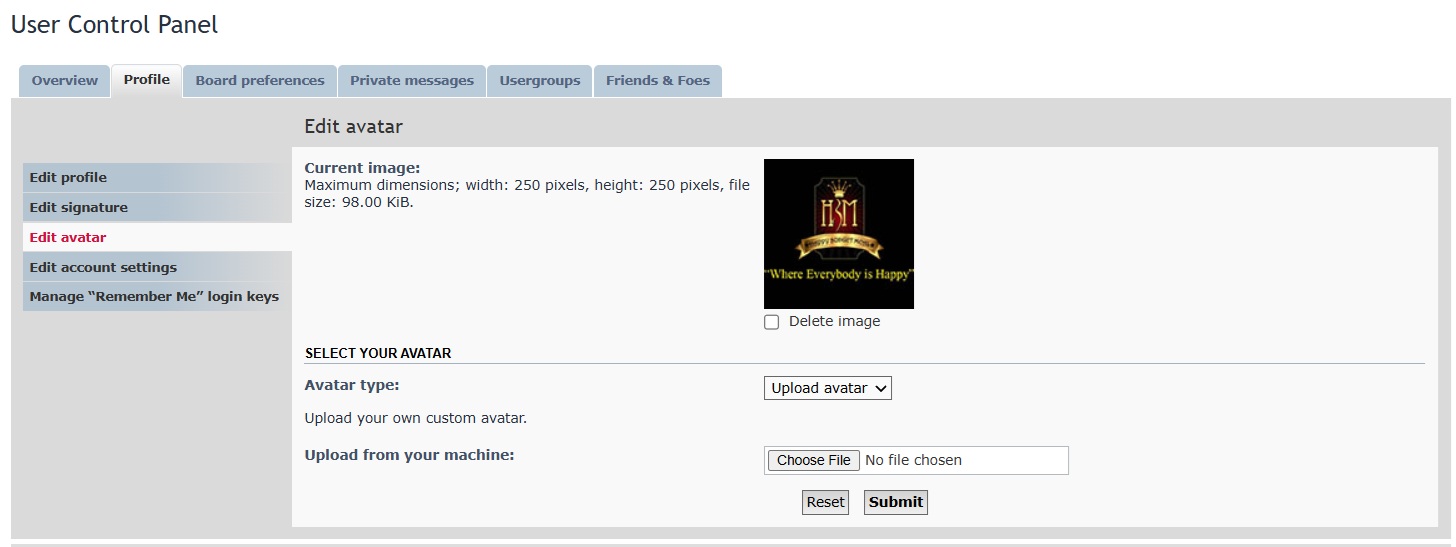
1. Go to your user control panel
2. Click Profile
3. Edit Avatar
4. Avatar Type -> Upload Avatar
5. Choose File -> maximum dimensions 250 pixels height , 250 pixels width
6. once uploaded
7. click submit
Re: How to change profile picture / avatar
Posted: Mon Aug 10, 2026 3:16 pm
by SpongeB00bs
Ginawa ko na kaso mukang malalaki yung picture dimension etc. Nya...nawala na kc yung dating account ko yung Fujiko or Khim Fujiko yata yun...c Annie kc gumawa nung account ko na yun eh...
Re: How to change profile picture / avatar
Posted: Wed Aug 12, 2026 9:57 pm
by hbm
SpongeB00bs wrote: ↑Mon Aug 10, 2026 3:16 pm
Ginawa ko na kaso mukang malalaki yung picture dimension etc. Nya...nawala na kc yung dating account ko yung Fujiko or Khim Fujiko yata yun...c Annie kc gumawa nung account ko na yun eh...
Yes may size lang na pwede for profile pic.
Fujiko

longtime
Re: How to change profile picture / avatar
Posted: Sat Aug 15, 2026 4:28 am
by SpongeB00bs
Hayzzz pano kaya yun...eh kht mag selfie ako ayaw prin eh

nkakaloka nman...by the way kilala mko?nag baka sakali lang ako ulit mag open eh...c Annie nag sabi sakin ng site na to naalala ko lang kya inopen ko...kaso wala na pla yung dating account na ginawa nya sakin.
